Focusrite Scarlett Solo 4th Gen Audio Interface
As an Amazon Associate I earn from qualifying purchases.
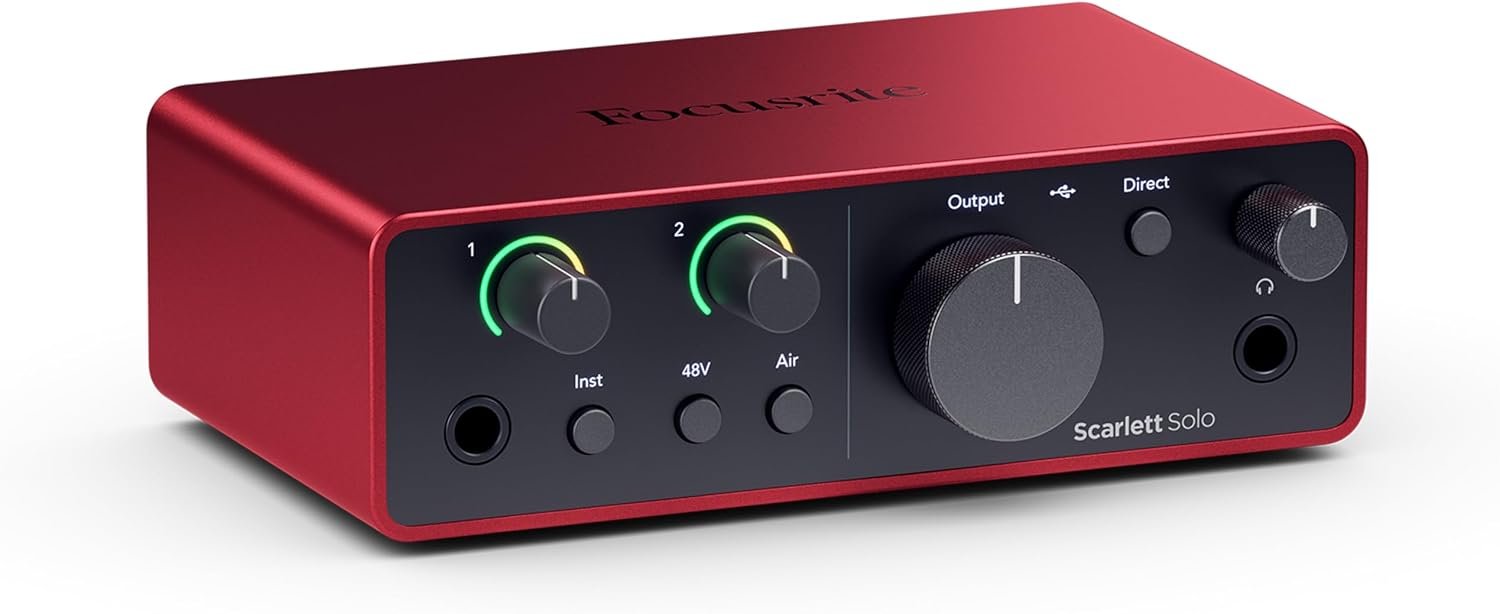
The Focusrite Scarlett Solo 4th Gen is designed for musicians who want a simple way to record guitar and vocals at home without building a complicated studio setup. It gives you a dedicated instrument input for guitar, a microphone preamp, headphone monitoring and USB-C connectivity in a compact desktop unit.
That straightforward layout is a big part of the appeal. You can plug in a guitar, connect a microphone, open your recording software and start capturing ideas without dealing with a large mixer or unnecessary controls. For solo musicians, songwriters and guitarists putting together a first serious home-recording setup, the Scarlett Solo keeps the signal path simple and easy to understand.
How Well Does the Scarlett Solo Work for Guitar Recording?
The dedicated instrument input is one of the main reasons the Scarlett Solo suits guitarists so well. You can plug an electric guitar or bass directly into the interface and record a clean signal into your computer, ready to use with amp-simulation software, effects plug-ins or a digital recording setup.
That makes it particularly useful for late-night recording or home studios where putting a microphone in front of a loud guitar amplifier is not practical. You can work quietly through headphones while still capturing a clean, detailed signal that can be shaped afterwards.
The simple input layout also keeps the process uncomplicated. Rather than spending time routing signals through a larger interface, you can concentrate on the performance and the sound you want to build inside your recording software.
What Is the Microphone Preamp Like?
The Scarlett Solo 4th Gen includes a dedicated microphone preamp for vocals, acoustic guitar or other mic-based recording. That makes it useful for songwriters who want to capture both an instrument and a vocal without moving into a larger interface.
Focusrite’s Air mode can also be switched in when you want a little more presence and brightness from the microphone signal. It is not something every recording needs, but it can be useful for bringing extra clarity to vocals or acoustic instruments without immediately reaching for plug-ins.
For a compact interface, the preamp section is deliberately simple. You get enough control to set a healthy recording level and monitor what is happening without being distracted by a large bank of studio controls.
How Useful Is Direct Monitoring?
Direct monitoring lets you hear the incoming guitar or microphone signal through your headphones without waiting for the sound to travel through the computer and back again. That can make recording feel much more natural, especially when timing matters.
For guitarists, it is useful when you want a clean, immediate reference while tracking. For vocals, it helps avoid the distracting delay that can make singing against a backing track feel uncomfortable.
The Scarlett Solo keeps this control simple, which suits the overall design of the interface. You can focus on getting the level right, hearing yourself clearly and recording the performance rather than spending time configuring a complicated monitoring setup.
Can You Record Guitar and Vocals at the Same Time?
Yes. The Scarlett Solo gives you a separate microphone input and instrument input, so a singer-songwriter can record a vocal and a guitar at the same time rather than laying down every part separately.
That makes it particularly useful for capturing performances that depend on the natural interaction between singing and playing. You can still record the two sources onto separate tracks in your recording software, giving you control over their levels and processing afterwards.
The limitation is that the Solo is designed around one microphone and one instrument rather than a larger multi-input session. For one musician working at home that keeps things refreshingly simple, but recording several microphones or multiple musicians at once calls for a larger interface.
What the Scarlett Solo Feels Like to Use
The Scarlett Solo has a compact, solid desktop feel that suits smaller home-recording setups well. The controls are spaced clearly enough that you are not constantly reaching around cables, and the main gain controls are easy to see and adjust while you are recording.
The front-panel layout also makes the interface feel approachable. Guitar, headphones and monitoring controls are all within easy reach, while the microphone connection stays neatly out of the way at the rear.
That simplicity is important. The Scarlett Solo does not feel like studio equipment that needs to be “learned” before it becomes useful. Once the drivers and recording software are set up, the hardware itself quickly becomes something you stop thinking about and simply use.
The Drawbacks
The Scarlett Solo is intentionally simple, and that means its biggest limitation is the number of inputs. One microphone input and one instrument input are enough for a solo musician, but the interface quickly becomes restrictive if you want to record a full drum kit, several microphones, stereo keyboards or multiple musicians at the same time.
The direct-monitoring setup is also fairly basic. It does the important job of letting you hear the incoming signal without noticeable delay, but there is not the same level of routing flexibility you would get from a larger studio interface. If you want separate monitor mixes or more detailed headphone control, you will eventually outgrow the Solo.
There is only one headphone output, which is completely adequate for a single user but less convenient for collaborative sessions. Recording with another person usually means adding a headphone splitter or external headphone amplifier if both people need independent monitoring.
The compact format also leaves little room for future expansion. There are no additional microphone inputs, digital expansion ports or extra line inputs waiting to be used later. That is part of what keeps the Scarlett Solo affordable and easy to understand, but it is worth considering if your home studio is likely to become more ambitious.
Finally, the interface depends on a computer, tablet or compatible recording setup to do most of the creative work. The Scarlett Solo itself does not provide amp models, effects or standalone recording. Guitarists expecting an all-in-one practice and recording device will still need software to shape the sound after it enters the computer.
Those limitations do not make the Scarlett Solo a weak interface. They simply define what it is best at: one musician, a small recording setup and a straightforward path from instrument or microphone into the computer.
Who the Scarlett Solo Suits Best
The Scarlett Solo is a strong fit for guitarists, singers and songwriters who want to record at home without building a complicated studio. It suits players who mainly work alone and want a reliable way to capture guitar, bass, vocals or acoustic instruments directly into recording software.
It also makes sense for beginners who want something straightforward enough to learn quickly but capable enough to keep using as their recording skills improve.
If you expect to record several microphones, a full band or more complex stereo setups, a larger interface will give you more room to grow. But for one musician working from a desk, the Scarlett Solo keeps the setup clean, practical and easy to manage.
Is the Focusrite Scarlett Solo 4th Gen Worth Having?
The Scarlett Solo works best when you want a clean, dependable way to get guitar, vocals or other instruments into a computer without turning the recording process into a technical exercise. Its simple layout, dedicated instrument input and straightforward monitoring make it especially easy to live with in a small home studio.
It does not offer the expansion of a larger interface, and that is worth keeping in mind if you expect your setup to grow quickly. But for one musician recording ideas, songs, practice sessions or finished tracks at home, the Solo covers the essentials without adding unnecessary complexity.
That balance is what makes it such a sensible piece of equipment. It is compact enough to stay on the desk, simple enough to use every day, and capable enough to become a dependable part of a serious home-recording setup.
Explore more home-recording gear in our Recording & Studio section.
As an Amazon Associate I earn from qualifying purchases.



One Comment
Comments are closed.